
Merchant Center recovery
We will fix the causes of a Merchant Center suspension before a new review
We look beyond the Google notification. We check the website, business data, product data, checkout and linked accounts to find the root cause of the suspension.
We agree on fixes, record evidence and prepare the store for a review.
WebsiteBusiness dataProduct dataCheckoutLinked accounts
Google makes the final decision on reinstatement.
Issue detectedSystem check required
Ready for reviewChanges confirmed
Diagnostic map 0 / 5
Preparing diagnostics
We check the starting conditions
Whether the service fits your case
Recovery suits operating stores that are ready to resolve the causes of a suspension, not just resubmit a request.
A complicated account history does not mean an automatic refusal: first we separate a workable recovery project from cases that violate the rules.
Standard recovery
Suitable
There is a real business and a working store, and the discrepancies found can be confirmed and fixed.
- an operating business and transparent seller data;
- the products are allowed under Google's rules;
- a buyer can go through the path to payment;
- you are ready to fix the root causes of the suspension.
Extended diagnostics
A separate review is needed
Such cases can be assessed only after checking the markets, sales model and history of linked accounts.
- dropshipping or sales in several countries;
- a linked Google Ads and a complicated account history;
- two or more rejected reviews;
- products from restricted categories.
Service limits
We do not take on
We do not help bypass the rules, conceal history or confirm information that cannot be verified.
- counterfeit products;
- fake data, identity or documents;
- hiding content and different versions of the website for a review;
- replacement accounts and a hidden history of suspensions.
Not sure which group your situation belongs to?
We will check the inputs and outline a realistic next step. Passwords and documents are not needed at the first stage.
We look for the root cause
Why one appeal is not enough
The Google notification shows a symptom. The cause of the suspension may lie in business data, on the website, in product data, in checkout or in the history of linked accounts.
So first we compare facts across all surfaces, then fix the discrepancies and only after verification prepare a review.
01 · Symptom
Notification received
The wording reports a problem but does not always identify its origin.
For example: “Website needs improvement”02 · Diagnostics
We compare five surfaces
- Business dataidentity and contacts
- Website and policiestrust and mandatory terms
- Data and markupprice, availability and attributes
- Checkoutpayment, shipping and returns
- Payment settings and linked accountsMerchant Center, Google Ads and change history
03 · Control
Data aligned
Changes confirmed, evidence collected, the store prepared for a review.
Ready for reviewTraining example
One product — three sources of facts
On the product page the price may be correct while the product data or checkout shows a different shipping condition. The notification will not show the whole chain — the discrepancy is visible only when comparing.
The images are illustrative and explain the method of checking; they do not depict Google's interface.
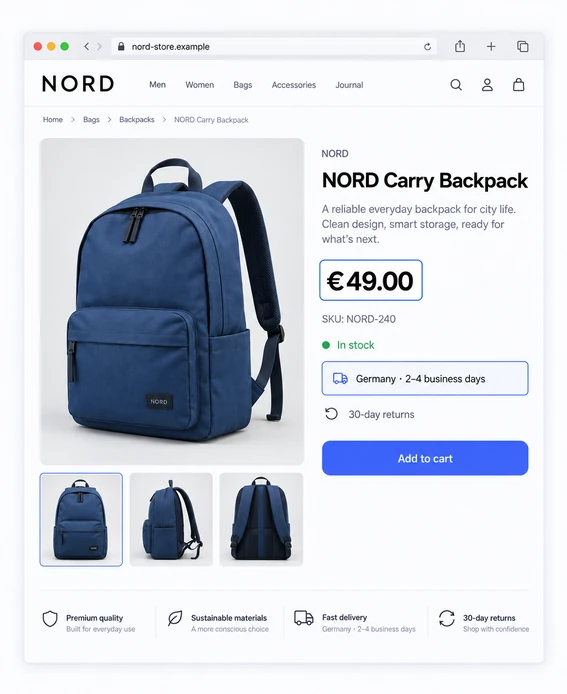
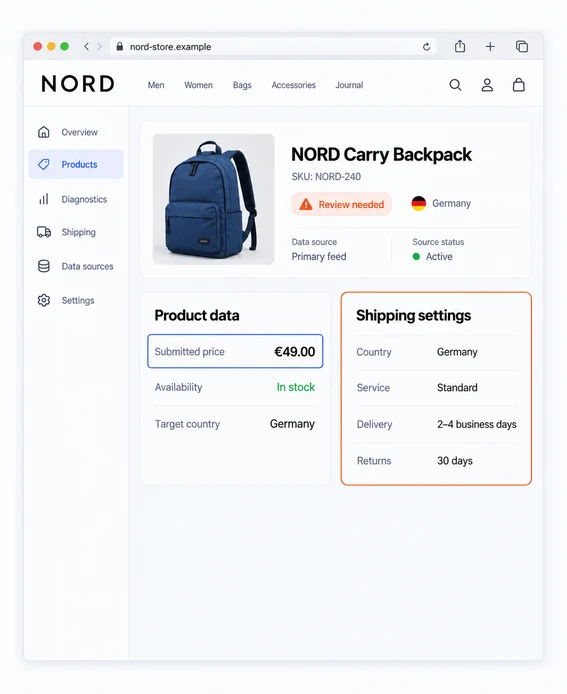
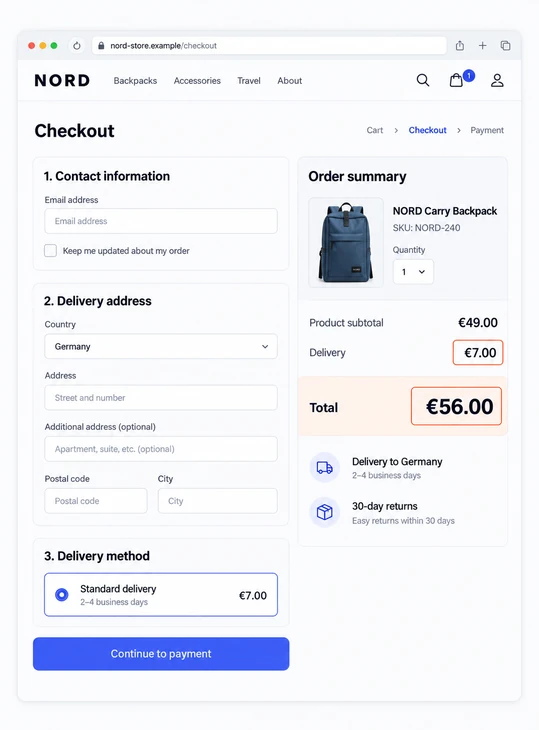
Direct answer: we submit a review only after business data, the website, product data, checkout and linked accounts are aligned with each other.
Full project scope
What recovery includes
We check not a single Merchant Center screen but the whole store system: from the applicability of the project and business data to checkout, evidence and review preparation.
We agree the scope of fixes before work starts. The report shows what was checked, what was changed and which result was confirmed.
Show 8 areas of workWe check → we fix → result
-
01
Applicability and starting state
CheckingThe business model, products, markets, status and account history.
We fixWe determine the service's applicability, boundaries and initial risks.
ResultA recorded baseline and the agreed project scope.
-
02
Business and trust
CheckingLegal, contact and public data of the seller.
We fixWe remove verifiable contradictions in the business identity.
ResultConsistent and transparent information about the seller.
-
03
Website and terms
CheckingProduct pages, contacts, policies and mandatory terms.
We fixWe close gaps and align the store's actual promises.
ResultA clear and consistent buyer experience.
-
04
Product data and structured markup
CheckingProduct data, product pages and structured markup, price, availability and attributes.
We fixWe synchronize the available values and data sources.
ResultConsistent product data across all surfaces.
-
05
Checkout and purchase terms
CheckingPayment, shipping, returns and the order total before payment.
We fixWe align cost, timing, methods and published rules.
ResultA predictable buyer journey without hidden discrepancies.
-
06
Merchant Center and connections
CheckingSettings, domain, markets, currencies and linked accounts.
We fixWe resolve the configuration and connection conflicts that can be resolved.
ResultA consistent store and account ecosystem.
-
07
Agreed fixes
CheckingPriorities, dependencies and evidence for every issue.
We fixWe make the agreed fixes or give precise tasks to the team.
ResultA change log with owners and statuses.
-
08
Control, evidence and review
CheckingFixes re-tested, including links, scenarios and control orders.
We fixWe close remaining comments and gather an evidence pack.
ResultConfirmed readiness for a review.
The project result is the confirmed readiness of the store for a review. Google makes the final decision on reinstatement.
Start with diagnosticsMethodology and applicability
How the 147 checks are applied
147 is the scope of our diagnostic register, not an official list of Google requirements and not a promise to mechanically check irrelevant items.
147checks
12groups
4areas
1report with statuses
How applicable checks are selected4 areas · project context filter
Register contents
Four areas
-
01Business and trust38
Business and identity · Products, supply and substantiation of claims · Website and terms transparency
-
02Shipping and purchase36
Shipping and taxes · Returns and refunds · Purchase and payment
-
03Products and data44
Product pages and landing pages · Product data and attributes · Structured data
-
04Technical and account29
Technical access and stability · Merchant Center settings · Linked accounts and review readiness
Training report row
MC-044 Standard shipping rates
Method
Compare the website, Merchant Center and checkout at test addresses.
Applicability
All stores where shipping is offered to the buyer.
Evidence
Terms URL, account settings, a checkout screenshot and the date of the check.
Result
The discrepancy is recorded, the fix is assigned, a re-check is pending.
The full register contains the method, applicability and sources for each item. A problem found is not considered the cause of a suspension without confirmation from the project's facts.
View the full registerRecovery process
How a recovery project goes
The project moves from an applicability check to control of the result. At every stage it is clear in advance what we do, what we will need from you and what documented result will appear.
01–03DiagnosticsContext, starting state and audit
04FixesAgreed scope of work
05–06ControlQuality check and evidence pack
07–08Review and completionSupport and residual risks
Show all 8 stagesWhat we do · what we need from you · result
-
01What we do
Applicability assessment
We review the notification, business model, products and review history to determine whether recovery applies.
ResultA decision on the project format and the required access.
-
02What we do
We record the starting state
We save the initial state of notifications, diagnostics, settings and linked sources before making changes.
ResultThe starting point of the project with a date and confirmations.
-
03What we do
We run an end-to-end system audit
We compare the website, policies, product data and structured markup, checkout, Merchant Center and linked accounts.
ResultA register of discrepancies with evidence and priorities.
-
04What we do
We agree on and make the fixes
We define the scope of work, make the agreed changes and record each fix made.
ResultA fix plan and a log of completed work.
-
05What we do
We repeat quality control
We test pages on desktop and smartphone, checkout and up-to-date product data after the changes.
ResultThe quality control status and a list of remaining deviations.
-
06What we do
We assemble an evidence pack
We combine links, screenshots, dates, statuses and the structure of the request, if a review is applicable.
ResultAn evidence pack and confirmed readiness.
-
07What we do
We support the review
We help prepare the submission and review Google's response within the chosen package.
ResultA recorded response and the next well-founded step.
-
08What we do
We close the project and record residual risks
We record the outcome, open risks, further actions and, if needed, a monitoring format.
ResultA final report and a post-project control plan.
Process control
A review does not start automatically. First we confirm the fixes and the readiness of the data; Google makes the final decision.
Tangible result
What the client receives
The project result is not limited to a single review. You keep a working set that shows what was found, what was changed, what was verified and which risks are still open.

Register of discrepancies
Applicable discrepancies, evidence, priority and status.
Fix plan
The order of fixes, dependencies and responsible parties.
Change log
What was done, who confirmed it and when it was verified.
Links and screenshots
Actual URLs, scenarios, dates and visual confirmations.
Evidence pack
Collected evidence for a well-founded review.
Quality control status
Repeat checks on desktop and smartphone, of product data and checkout.
Request structure
Text and facts for submission, if a review is applicable and available.
Residual risks
Open risks, limitations and the next permissible actions.
The set stays with the client regardless of Google's decision.The format and contents of the files depend on the agreed package.
Choose a service
Start with a review
Choose the work based on the diagnostic results: get a plan, make the fixes or review a complex situation.
Choose a format
Audit
You need to find the causes and get a clear fix plan.
Price guide
from390€
Check, evidence and plan- Website and account check
- Evidence report
- Fix priorities
- Tasks for the developer

Recovery
You need an audit, fixes and preparation for a review.
Price guide
from890€
Audit and agreed fixes- Store and account audit
- Agreed fixes
- Verification of changes made
- Request preparation

Complex case
Repeated rejections, several markets or linked accounts.
Price guide
from1,490€
Individual case review- Review of repeated rejections
- Store markets and accounts
- Change history check
- Individual work plan
Price guides. The amounts shown help you compare work formats. We fix the final price and scope after reviewing the store. Google makes the reinstatement decision.
Access and responsibility
Without sharing passwords or bypassing the rules
We use separate invitations and the minimum necessary permissions. Any change that could affect sales or business data is agreed first.
How we handle access
Controlled roles
- a Merchant Center user invitation;
- a separate Shopify staff invitation, if required;
- a separate temporary WordPress administrator account with two-factor protection;
- view-only Google Ads access for diagnostics;
- removal of temporary access after completion.
Passwords and 2FA codes are not accepted.
What we do not do
Service limits
- replacement accounts and bypassing restrictions;
- fake documents, identity or information;
- work with prohibited products;
- critical changes without written approval;
- promising a result on Google's behalf.
MerchantRevive delivers the agreed scope; Google makes the decision.
Verified on 22.09.2026: Google allows managing roles through the user management section. Official help on access.
Timelines and dependencies
What depends on us and what depends on Google
We separate the active time of the project from the external review. We confirm timelines for diagnostics and fixes based on project data; Google's review time and the waiting period are not a MerchantRevive SLA.
- 01Initial assessment
We check the inputs and tell you whether recovery fits and what data is needed.
Starts after you contact usWe need the URL, country, platform, notification and review history.
- 02Diagnostic audit
We confirm the timeline after receiving the full set of data and access.
Availability of sourcesThe pace is affected by the platform, markets, integrations and completeness of information.
- 03Fixes and quality control
We plan after the audit according to the agreed scope and dependencies.
Approvals and developmentSome tasks may depend on your team or third-party services.
- 04Readiness for review
Submission starts after quality is confirmed and the evidence is verified.
Google's reviewGoogle determines the response time and the waiting period; no acceleration is promised.
Google states that a review may have restrictions and a mandatory waiting period. Official help on reviews, verified on 22.09.2026.
Frequently asked questions about the service
Short answers before you start
Here are the limits of recovery, access, timelines and results. The details of a specific store are fixed in the agreed scope of work.
Ask about your caseDo you guarantee Merchant Center recovery?
No. MerchantRevive is responsible for the agreed scope, the quality of the review, the evidence and the changes made. The reinstatement decision, additional checks and timelines remain with Google.
What does standard recovery include?
Diagnostics of the applicable surfaces, an agreed fix plan, completion of the tasks included in the scope, a change log, repeat quality control and an evidence pack. The exact scope, the number of review cycles and the support period are fixed before work starts.
Do I need to share a password?
No. We do not accept passwords or two-factor authentication codes. If access is needed, we use a Merchant Center user invitation, a separate Shopify staff invitation or a separate temporary account with agreed permissions.
Do you fix the website and product data?
Yes, when this work is within the agreed scope and the necessary permissions are available. Critical changes are published after approval; other tasks are passed to your team with a priority and verification criteria.
How long do the audit and fixes take?
The timeline for diagnostics is confirmed after we receive the data and access. The timeline for fixes depends on the number of discrepancies, the platform and your team's involvement; it is fixed after the audit, and Google's review time is not a commitment of MerchantRevive.
What happens after a rejected review?
We save Google's actual response, check which changes were made before submission and re-assess open risks. A new review is prepared only when it is justified and the corresponding action is available in Merchant Center.
Do you work with Shopify and WooCommerce?
Yes. For Shopify and WooCommerce we use separate access scenarios and checks of integrations, product data, structured markup and checkout. The platform affects the applicable checks and the scope of fixes.
Is a Google Ads appeal included?
No, by default this is a separate service. A linked Google Ads account is taken into account when diagnosing the ecosystem, but its appeal, policy and evidence scope are agreed separately.
Do all 147 checks have to be performed?
No. The register contains 147 diagnostic items, but a specific project includes only the applicable checks, taking into account the platform, market, business model, products and account history.
What will I get if Google refuses again?
You keep the register of discrepancies, the fix plan, the change log, the evidence pack, the quality control status and the analysis of Google's response. The final report will state residual risks and the next permissible step, without promising a result that depends on Google's decision.
First step without passwords
Start with diagnosing the causes of the suspension
We will check applicability, clarify the data needed and outline a realistic next step. The full scope and price are fixed before fixes begin.
Start a diagnostic audit